
Addressables 세팅 내용
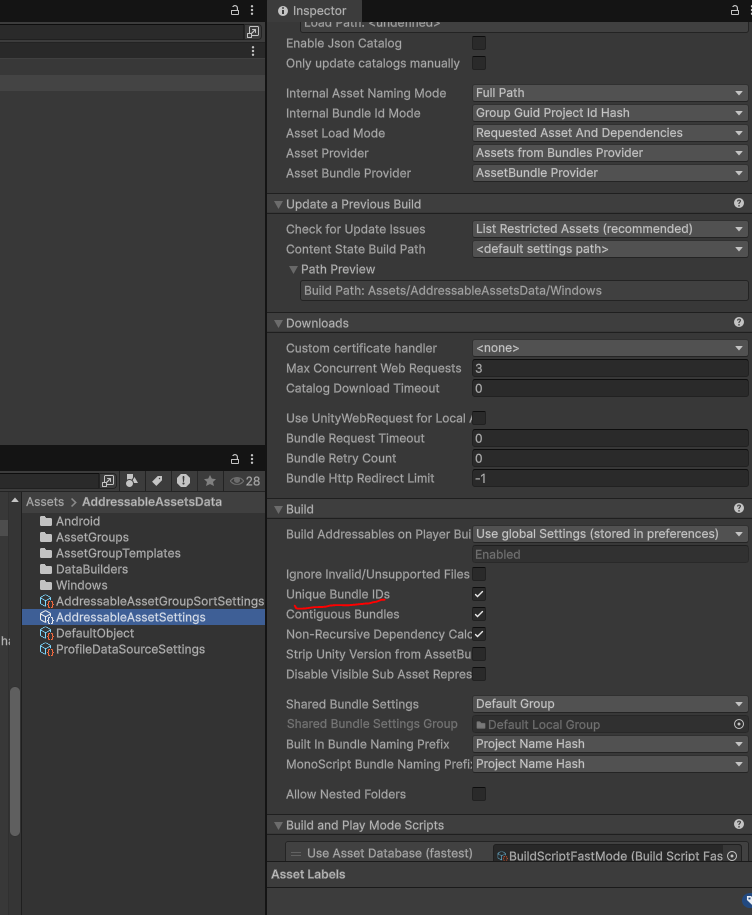
1. Unique Bundle IDs
설정
Addressable Asset Settings
 → Unique Bundle IDs
 → 체크
Addressables는 에셋을 AssetBundle 형태로 빌드합니다.
업데이트가 발생하면 동일한 번들 이름이 캐시에 남아 충돌할 수 있습니다.
빌드 예시
monster.bundle (old)
monster.bundle (new)
이 문제를 방지하기 위해 Unity는 번들 이름에 고유 ID를 추가합니다.
monster_bundle_123.bundle
monster_bundle_456.bundle
이렇게 하면 번들 캐시 충돌을 방지할 수 있습니다.
2. Build Remote Catalog
설정
Addressable Asset Settings
 → Build Remote Catalog
 → 체크
Addressables는 Catalog 파일을 사용하여 에셋 정보를 관리합니다.
Catalog에는 다음 정보가 포함됩니다.
에셋 주소
번들 위치
의존성 정보
Remote Catalog를 사용하면 서버에서 Catalog를 다운로드하여 변경된 번들을 자동으로 업데이트할 수 있습니다.
동작 방식
앱 실행
 → 서버 Catalog 다운로드
 → 변경된 번들 다운로드
이를 통해 앱 업데이트 없이 에셋만 업데이트할 수 있습니다.
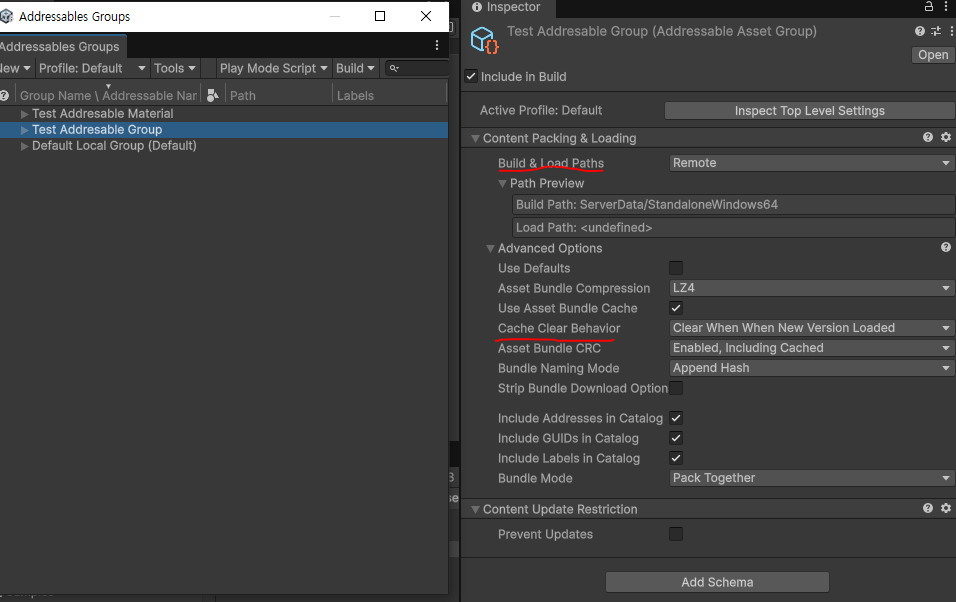
3. Cache Clear Behavior
설정
Group Settings
 → Cache Clear Behavior
 → Clear When New Version Loaded
Addressables는 다운로드한 번들을 디스크 캐시(Unity Caching 시스템)에 저장합니다.
문제
업데이트 발생
 → 이전 번들이 캐시에 계속 남아 있음
설정
Clear When New Version Loaded
새 Catalog가 다운로드되면 이전 번들을 자동으로 삭제하여
불필요한 캐시가 쌓이는 것을 방지합니다.
4. Build Path / Load Path
Addressables는 다음 두 가지 경로를 설정합니다.
Build Path
 → 번들을 어디에 빌드할지

Load Path
 → 런타임에서 어디서 로드할지
Local
Build Path : LocalBuildPath
Load Path : LocalLoadPath
Remote
Build Path : RemoteBuildPath
Load Path : RemoteLoadPath
용도에 따라 Local 또는 Remote로 설정하여 사용합니다.
Addressables 세팅 방법
System Settings
Unique Bundle IDs
Build Remote Catalog
Group 설정
Local 리소스
Default Local Group
Build Path : Local
Load Path : Local
Remote 리소스
Remote Group
Build Path : Remote
Load Path : Remote
Cache 설정
Clear When New Version Loaded
새 버전이 로드될 때 이전 캐시 번들을 자동으로 삭제합니다.
어드레서블 매니져 테스트 코드
using System.Collections.Generic;
using UnityEngine;
using UnityEngine.AddressableAssets;
using UnityEngine.ResourceManagement.AsyncOperations;

public class AddressableMTest : MonoBehaviour
{
    private readonly HashSet<AsyncOperationHandle> _handles = new (); //어드레서블 메모리 관리용

    public void Initialize()
    {
        var handle = Addressables.InitializeAsync();
        handle.WaitForCompletion(); //초기화는 기다려야함
    }
    public AsyncOperationHandle<T> LoadAssetAsync<T>(string key)
    {
        //에셋 다운로드
        var handle = Addressables.LoadAssetAsync<T>(key);
        _handles.Add(handle);
        return handle; //핸들을 반환하여 메모리 관리를 위해 사용
    }
    public T LoadAssetSync<T>(string key)
    {
        var handle = Addressables.LoadAssetAsync<T>(key);
        //동기로드
        T asset = handle.WaitForCompletion();

        //상태가 성공이 아니라면
        if(handle.Status != AsyncOperationStatus.Succeeded)
        {
            Debug.LogError($"Failed to load asset : {key}");
            return default;
        }

        _handles.Add(handle);
        return asset;
    }
    public void Release(AsyncOperationHandle handle)
    {
        if(handle.IsValid())
        {
            Addressables.Release(handle);
            _handles.Remove(handle);
        }
    }
    public void ReleaseAll()
    {
        foreach(var handle in _handles)
        {
            if(handle.IsValid())
            Addressables.Release(handle);
        }
        _handles.Clear();
    }


}

비동기, 동기 테스트 코드
using UnityEngine;
using UnityEngine.InputSystem;
using UnityEngine.ResourceManagement.AsyncOperations;

//비동기 사용 예제
public partial class AddressablesUsageExample : MonoBehaviour
{
    [SerializeField] private AddressableMTest addressableManager;
    [SerializeField] private string assetKey = "Sphere.prefab"; //로드할 에셋의 키
    [SerializeField] private string assetKey2 = "Cube.prefab"; //로드할 에셋의 키

    private AsyncOperationHandle<GameObject> assetHandle; //특정 에셋을 로드하기 위한 핸들

    private bool isInitialized = false;

    private void Start()
    {
        // Addressables 초기화는 보통 한번만 한다
        addressableManager.Initialize();
        isInitialized = true;
    }

    private void Update()
    {
        if(Keyboard.current == null)
        {
            return;
        }

        if (Keyboard.current.aKey.wasPressedThisFrame)
        {
            AsyncLoadAsset();
            Debug.Log("AsyncLoadAsset");
        }
        else if (Keyboard.current.sKey.wasPressedThisFrame)
        {
            SyncLoadAsset();
            Debug.Log("SyncLoadAsset");
        }
        else if (Keyboard.current.dKey.wasPressedThisFrame)
        {
            ReleaseAll();
            Debug.Log("ReleaseAll");
        }
    }

    private void AsyncLoadAsset()
    {
        if(!isInitialized)
        {
            addressableManager.Initialize();
            isInitialized = true;
        }

        //비동기 로드( 매니져 코드 확인 )
        assetHandle = addressableManager.LoadAssetAsync<GameObject>(assetKey);

        assetHandle.Completed += OnAssetLoad;
    }

    private void OnAssetLoad(AsyncOperationHandle<GameObject> handle)
    {
        if (handle.Status == AsyncOperationStatus.Succeeded)//여기는 인자로 받는 handle이 참조하는 객체의 상태를 확인하는 것
        {
           // GameObject asset = Instantiate(handle.Result);//result에 gameobject

            Debug.Log("Asset loaded successfully");
        }
        else
        {
            Debug.LogError("Failed to load asset");
        }
    }

    private void SyncLoadAsset()
    {
        if(!isInitialized)
        {
            addressableManager.Initialize();
            isInitialized = true;
        }

        //동기 코드( 매니져 코드 확인 )
        GameObject asset = addressableManager.LoadAssetSync<GameObject>(assetKey2);

        if(asset != null)
        {
            Debug.Log("Asset loaded successfully");
           // Instantiate(asset);
        }
        else
        {
            Debug.LogError("Failed to load asset");
        }
    }

    public void ReleaseAll()
    {
        addressableManager.ReleaseAll();
    }

    private void OnDestroy()
    {
        if(assetHandle.IsValid())
        {
            addressableManager.Release(assetHandle);
        }
    }
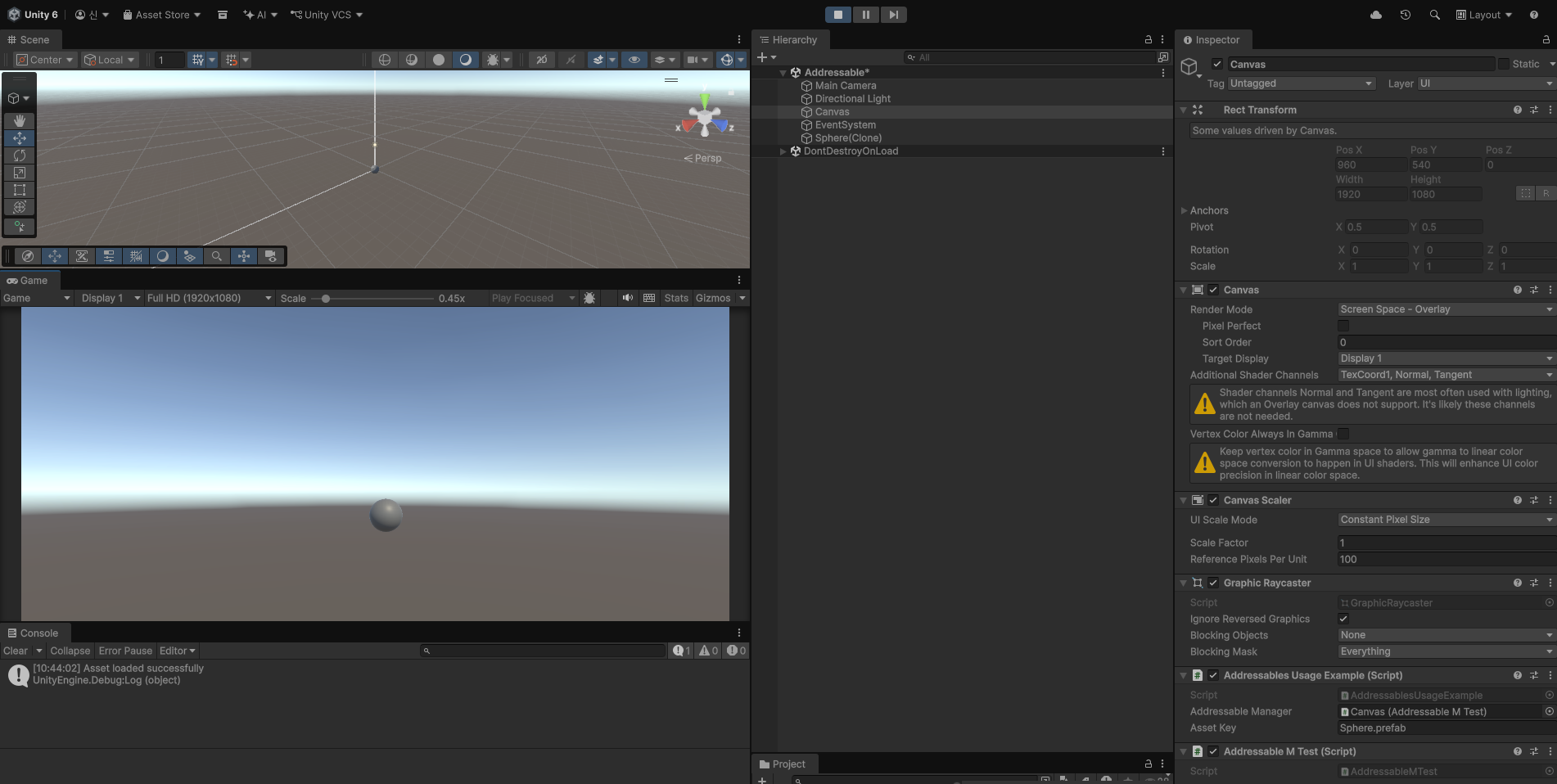
}
- Addressables 로드 시 실제 메모리는 증가하는가?
- Release() 호출 시 메모리는 감소하는가?
- 메모리는 즉시 원래 상태로 돌아가는가?
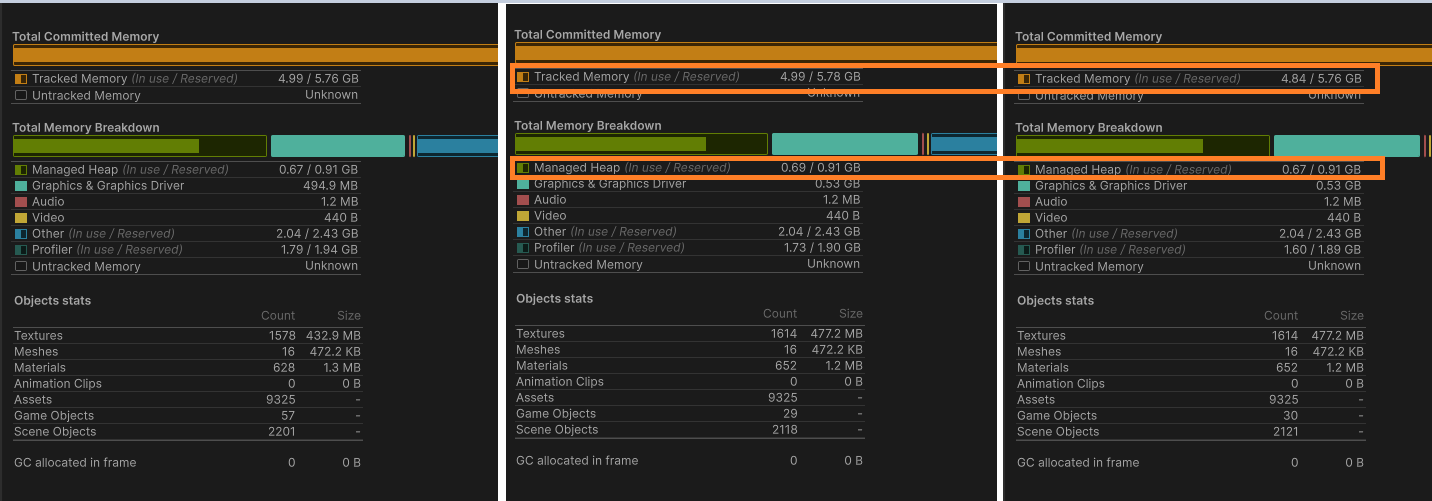
이를 확인하기 위해 Unity Profiler를 이용하여 메모리 변화를 비교하는 실험을 진행하였다.
실험 결과
1) 시작 -> 20개 로드
| 항목 | 변화 |
| Texture Count | 1578 → 1614 |
| Texture Memory | 432.9MB → 477.2MB |
| Graphics Memory | 494.9MB → 약 530MB |
| Material Count | 628 → 652 |
Addressables로 로드된 에셋이 실제로 Texture, Material, Graphics Memory 증가로 이어지는 것을 확인할 수 있었다.
즉 Addressables Load는 단순히 C# 메모리뿐 아니라 GPU 리소스에도 영향을 준다.
2) ReleaseAll 호출 후
| 항목 | 변화 |
| Tracked Memory | 감소 |
| Managed Heap | 감소 |
| Texture Memory | 거의 변화 없음 |
| Graphics Memory | 거의 변화 없음 |
3) 결과정리
1. Addressables Load는 실제 메모리 사용량을 증가시킨다
로드 후
- Texture Memory 증가
- Graphics Memory 증가
- Material 증가
가 확인되었다.
즉 Addressables 로드는 실제로
GPU Memory
모두에 영향을 준다.
2. Release는 실제로 메모리 참조 해제에 영향을 준다
Release 이후
Managed Heap
이 감소하였다.
Addressables 내부 reference count가 감소하면서 일부 메모리가 정리된 것을 의미한다.
3. 하지만 모든 메모리가 즉시 반환되지는 않는다
Release 이후에도
Graphics Memory
는 크게 감소하지 않았다.
- Unity 내부 캐시
- GPU 리소스 관리 방식
- Editor 환경 특성
- AssetBundle 메모리 유지
에셋 참조(reference)를 해제하는 동작이다. 실제 메모리 반환 시점은 Unity 내부 메모리 관리 정책 및 GPU 리소스 상태에 따라 달라질 수 있다.
++Addressables Release는 Instantiate된 GameObject를 제거하지 않는다.
씬 오브젝트 제거는 Destroy 또는 ReleaseInstance를 사용해야 한다.
참고)
https://www.youtube.com/watch?v=Z84GCeod_BM&t=169s
'유니티' 카테고리의 다른 글
| 프레임을 건너뛴다라는게 무슨말일까? (0) | 2026.03.13 |
|---|---|
| CancellationTokenSource test code (0) | 2026.03.13 |
| Unity Garbage Collection (0) | 2026.03.11 |
| TIL . Unity Addressables (0) | 2026.03.11 |
| unity webgl 탭이름 및 아이콘 수정하는 방법 (0) | 2026.02.25 |
