반응형
0. 커서 다운로드
https://cursor.com/home?from=agents
Cursor: The best way to code with AI
Built to make you extraordinarily productive, Cursor is the best way to code with AI.
cursor.com
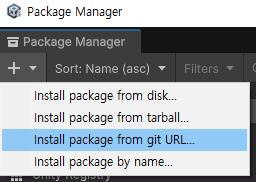
1. 패키지 매니져에서 url 넣기
https://github.com/boxqkrtm/com.unity.ide.cursor.git
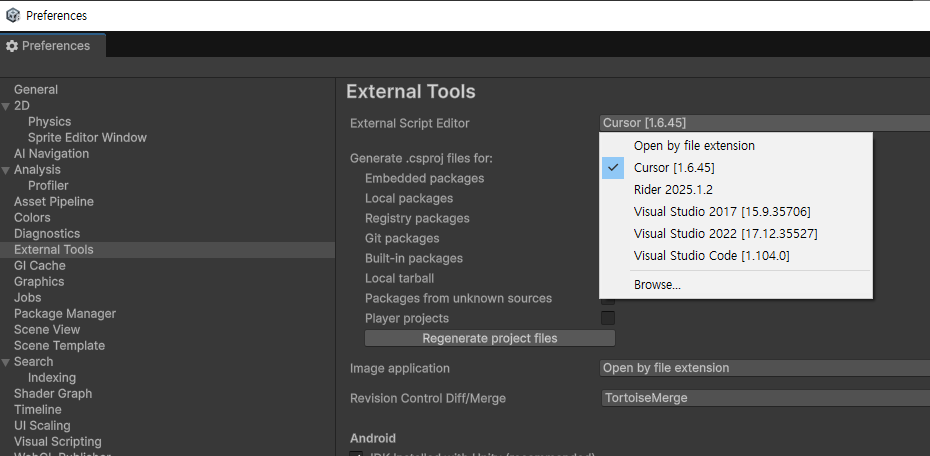
3. 커서로 바꿔주면 끝~
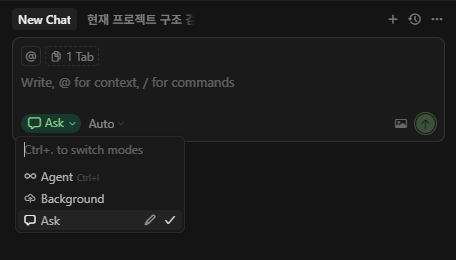
4. 스크립트 키면 커서로 실행이 될텐데 ask는 질문, agent로 코딩하면 됨
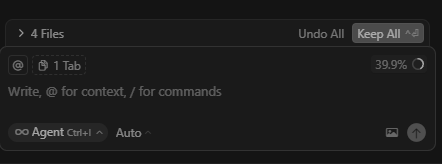
agent로 바꾸고 코딩 시키면
keep all로 적용
undo 를 통해 적용 x 시킬 수 있음
참고)
[Unity 유니티] 유니티에서 Cursor AI (커서 AI) 사용하기 / 연동하기 (패키지 매니저)
이전 포스팅에서는 Argument 설정으로 세팅하는 방법에 대해서 작성했는데이번에는 간단하게 패키지 매니저로 깃허브에서 패키지를 가져오는 방식을 알려주려고 한다. [Unity 유니티] 유니티에서
bo-ni.tistory.com
반응형
'유니티' 카테고리의 다른 글
| unity renderer.bound 이미지 인식 ui 만들기 (0) | 2025.10.02 |
|---|---|
| spine 유니티 연동하기 (0) | 2025.09.25 |
| 유니티 타일맵 관련 자료 조사 (0) | 2025.09.23 |
| Unity 6 Awaitable, AsyncOperation (0) | 2025.09.15 |
| Physics, SphereCastNonAlloc (0) | 2025.09.15 |